Moving a website can feel like moving house with a cat, a piano, and 3,000 tiny boxes labeled “misc.” It can go well. It can also get very silly, very fast. In SEO terms, a website migration means changing something big about your site. This could be a new domain, a new CMS, a new design, new URLs, HTTPS, or a full rebuild.
TLDR: Website migration can hurt SEO if search engines get confused. The biggest risks are lost rankings, broken links, missing pages, and bad redirects. The best plan is simple: audit first, redirect carefully, test everything, and monitor after launch. Treat migration like a big move, not a quick furniture shuffle.
What Is a Website Migration?
A website migration is any major change that affects how search engines crawl, index, or understand your site. It is not just “making the site prettier.” It is more like changing the roads, signs, doors, and room numbers in a hotel.
Common types of migration include:
- Domain migration: Moving from one domain to another.
- URL migration: Changing page addresses.
- CMS migration: Moving to a new platform, such as WordPress, Shopify, or another system.
- Design migration: Launching a new layout or structure.
- Protocol migration: Moving from HTTP to HTTPS.
- Content migration: Merging, deleting, or rewriting many pages.
Each one can affect SEO. Combine several at once, and things get spicy.
Why Website Migration Can Hurt SEO
Search engines like clear paths. They crawl your pages, follow links, read content, and store what they find. When you migrate a site, those paths may change. If you do not guide search engines properly, they may get lost.
Imagine a bakery moving across town. Old customers show up at the old address. There is no sign. No map. No forwarding note. So they leave. Search engines do the same thing. They hit a dead end, shrug politely, and move on.
The result can be scary:
- Rankings drop.
- Traffic falls.
- Sales slow down.
- Important pages disappear from search results.
- Users land on error pages.
The good news? Most migration disasters are avoidable. You just need a plan.
Main SEO Risks During Website Migration
1. Broken URLs
This is the classic migration monster. A page used to live at one URL. Now it lives somewhere else. If the old URL does not point to the new one, users see a 404 error. Search engines see a missing page.
Too many 404s can waste crawl budget and weaken trust signals. It also annoys humans. Humans do not enjoy digital dead ends.
2. Bad Redirects
Redirects are like forwarding addresses. They tell browsers and search engines where a page moved. For SEO, the best option is usually a 301 redirect. This says the move is permanent.
But redirects can go wrong. You may redirect every page to the homepage. Please do not. That is like telling every hotel guest they now sleep in the lobby.
Each old page should redirect to the most relevant new page. A product page should go to the same product, or a close replacement. A blog post should go to the updated version, not a random category.
3. Lost Content
Sometimes migration removes useful pages by mistake. This is painful. A page may bring traffic, backlinks, leads, or sales. If it vanishes, its SEO value may vanish too.
Before deleting anything, check performance. Some boring-looking pages are secret heroes. They may not look fancy, but they bring steady visitors.
4. Missing Metadata
Title tags, meta descriptions, headings, alt text, and canonical tags can disappear during migration. These small pieces help search engines understand each page.
If they go missing, rankings can wobble. Your site may still work, but search engines may not see it the same way.
5. Internal Link Problems
Internal links connect your pages. They help users explore. They also help search engines find important content.
After migration, internal links may point to old URLs. They may create redirect chains. Or they may break completely. This is messy and slow.

Best Practices Before Migration
Run a Full SEO Audit
Start with a full crawl of the current site. Save the data. This is your map before the big move.
Collect:
- All current URLs.
- Title tags and meta descriptions.
- Headings.
- Canonical tags.
- Status codes.
- Internal links.
- Backlinks.
- Organic traffic data.
This may sound dull. It is not glamorous. But it is your safety net. SEO loves safety nets.
Create a Redirect Map
A redirect map matches old URLs to new URLs. It is one of the most important migration documents.
Keep it simple. One old URL should point to one best new match. Avoid long redirect chains. Avoid loops. Avoid sending everything to the homepage like a lazy traffic cop.
Protect Your Top Pages
Find your most valuable pages. These are pages with strong traffic, strong backlinks, high conversions, or top rankings.
Give them VIP treatment. Check their content. Check their metadata. Check their redirects. Check their internal links. Then check them again while drinking coffee.
Keep the Same Content When Possible
If you change the design, CMS, URL structure, and content all at once, it becomes hard to know what caused a ranking drop. Try to keep important content stable during launch.
You can improve copy later. Migration day is not the best time to rewrite your whole site in pirate language, even if that sounds fun.
Best Practices During Launch
Test in a Staging Environment
Use a staging site before launch. This is a private test version of the new site. Crawl it. Click around. Break things before users do.
Make sure staging is blocked from search engines. You do not want Google indexing your practice site. That is like inviting guests to a rehearsal dinner by accident.
Check Redirects Right Away
Once the new site is live, test redirects fast. Check key pages first. Then crawl the whole site.
Look for:
- 404 errors.
- 302 redirects used by mistake.
- Redirect chains.
- Redirect loops.
- Pages blocked by robots.txt.
- Noindex tags in the wrong places.
Submit the New Sitemap
Create a fresh XML sitemap. Submit it in Google Search Console and other search engine tools if needed.
The sitemap helps search engines discover the new structure faster. It is not magic. It is more like leaving breadcrumbs. But breadcrumbs are useful when the forest is full of URLs.
Best Practices After Migration
Monitor Traffic and Rankings
Some movement is normal after migration. Do not panic if traffic wiggles for a few days or weeks. Search engines need time to process changes.
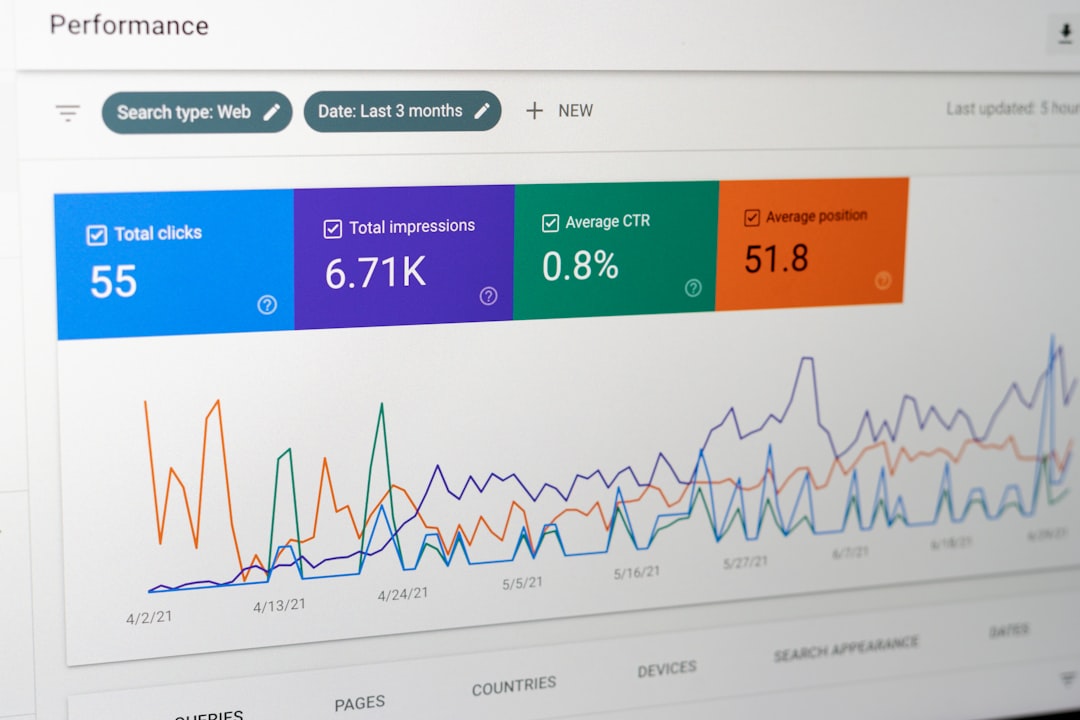
But watch closely. Compare traffic to the old site. Track rankings for important keywords. Check impressions, clicks, and indexing issues.
Watch Google Search Console
Search Console is your migration smoke alarm. It can show crawl errors, indexing problems, sitemap issues, and page experience signals.
Check it often after launch. Daily at first is smart. Weekly later is fine.
Fix Problems Fast
The faster you fix migration issues, the better. A bad redirect left alone for months can become a bigger problem. A missing page with backlinks can leak value every day.
Create a priority list. Fix high-traffic pages first. Fix pages with backlinks next. Then clean up the rest.
A Simple Migration SEO Checklist
- Before launch: Crawl the old site.
- Before launch: Save traffic and ranking benchmarks.
- Before launch: Map old URLs to new URLs.
- Before launch: Keep key content and metadata.
- Before launch: Test the staging site.
- At launch: Activate 301 redirects.
- At launch: Check robots.txt and noindex tags.
- At launch: Submit the new XML sitemap.
- After launch: Crawl the new site.
- After launch: Monitor traffic, rankings, and errors.
Final Thoughts
Website migration does not have to be a horror movie. It can be a clean, smart upgrade. The trick is to respect SEO from the start.
Do not wait until launch day to think about redirects. Do not delete pages because they “look old.” Do not assume search engines will figure everything out on their own. They are clever, but they still need signs.
Plan the move. Label the boxes. Leave forwarding addresses. Check the doors. Feed the SEO cat. If you do that, your website migration can protect your rankings and give your new site the fresh start it deserves.